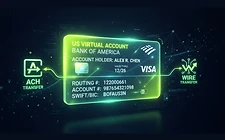
Business USD Account: How to Open a Virtual USD Account for Your Company
A business USD account lets your company receive US dollar payments from clients worldwide. Learn how virtual USD accounts work, what's required to open one, and how to combine one with automatic stablecoin conversion.
Ready to get paid in stablecoins?
Open your FinT365 account — receive fiat from clients worldwide and auto-convert to USDC/USDT.
Business USD Account: Open a Virtual USD Account for Your Company
Every international business needs a way to receive US dollars — the world's reserve currency and the default invoice currency for global trade. But opening a USD business account at a US bank requires a US entity, a US address, and often an in-person visit. A virtual business USD account removes all three obstacles.
This guide covers what a business USD account is, how virtual USD accounts work, what you need to open one, and how to pair it with automatic conversion to stablecoins.
What Is a Business USD Account?
A business USD account is a bank account denominated in US dollars, held in your company's name, that can receive incoming payments via ACH (domestic US transfers) and Wire (international SWIFT transfers). Clients send dollars to your account; you receive a routing number and account number just like a US-based company would.
A virtual USD account is issued by a regulated financial infrastructure provider (FinT365 uses Bridge) rather than a traditional bank. Functionally, your client can't tell the difference — they see a US routing number and account number in your company's name.
Why Your Business Needs a USD Account
- Invoice in dollars — most international B2B contracts are priced in USD
- Receive from US clients via ACH (free for the sender) instead of expensive SWIFT
- Avoid FX losses — no forced conversion to your local currency at bad bank rates
- Settle faster — ACH settles in 1–2 business days; SWIFT can take a week
How to Open a Virtual Business USD Account
1. Register and complete KYB
Business accounts require Know Your Business verification: company registration documents, beneficial ownership information, and a business address. This is a regulatory requirement — there is no legitimate way to skip it.
2. Get approved
KYB typically completes within one business day. Once approved, your company is eligible to open virtual accounts.
3. Open the USD account
Choose USD as the source currency. You receive:
- A US routing number and account number
- A beneficiary name (your company's legal name)
- A bank name and address (for international wire instructions)
4. Connect a destination (optional)
If you want automatic conversion, connect a crypto wallet and choose USDC or USDT on your preferred chain. Every incoming dollar payment converts to stablecoins automatically.
What You Need to Open a Business USD Account
- Company registration documents (articles of incorporation, certificate of formation)
- Business tax ID (EIN for US companies; local equivalent for non-US)
- Beneficial owner information (name, date of birth, address, ownership %)
- Registered business address
- Proof of address (utility bill, bank statement, lease)
Non-US companies can open a USD account — you don't need a US entity. The KYB process verifies your home-country registration instead.
Business USD Account vs. Traditional US Bank Account
Common Use Cases
- Agencies invoicing US clients in dollars
- SaaS companies collecting USD subscriptions
- Exporters receiving USD for goods
- Freelance collectives pooling dollar income
- Crypto-native startups that want treasury in stablecoins
Combining a USD Account with Crypto
The defining feature of a modern business USD account is automatic conversion. Instead of dollars sitting in a bank earning nothing, every incoming payment converts to USDC/USDT and lands in a wallet your company controls. This turns a passive bank account into an active on-chain treasury.
For businesses that pay suppliers, contractors, or themselves in crypto, this eliminates the manual step of buying crypto after each payment.
FAQ
Can a non-US company open a USD account? Yes. You don't need a US entity or address. KYB verifies your home-country registration.
Can my clients pay via ACH? Yes. Your account has a standard US routing and account number, so any US payer can send an ACH transfer.
Are the funds FDIC-insured? Funds held in virtual accounts are handled by the regulated infrastructure provider. Direct FDIC insurance applies to funds while held at the partner bank. Always confirm current terms with the provider.
Can I keep funds in dollars without converting? Yes — you can choose not to enable automatic conversion and hold dollars in the account, or use a Bridge wallet destination to keep funds as stablecoins for later fiat withdrawal.
Summary
A virtual business USD account gives your company a US banking identity without a US entity, opens in days instead of weeks, receives ACH and Wire transfers, and — uniquely — can automatically convert every dollar into stablecoins. For any business billing in USD, it's the modern alternative to a traditional US bank account.
Start receiving international payments today
Open a multi-currency account in minutes. Get paid by clients worldwide and auto-convert every payment to stablecoins — only on FinT365.
No credit card required · KYC takes under a minute